I know most of you bloggers out there are desperate to spice up your blog by changing the template of your desire. Well I would be more than happy to help you with this comprehensive tutorial TO CHANGE THE BLOGGER TEMPLATE.
A couple of days ago, Mr.
Monu Tamang emailed me about blog template. I was just happy to help him out. He is an ardent blogger out there. So you can do it too.
Lets get started NOW!
- First hit on the link that I have posted below. Well its an option, actually. You can choose from many out there. http://btemplates.com/
- Select a template that suits you best from the above link and download it.
- Your downloaded file will be in your document file inside download file. It will look like in picture below
4. Now you have to Extract the file. To do that; right click on the downloaded file and click on the WinRAR and Extract the file like in the picture below.
5.After you have clicked on extract the file, the following option will appear. So click on ok option (Picture below)
7. Now you will get a file like in the picture below. ( Remember you are going to use the file that's inside this folder.)
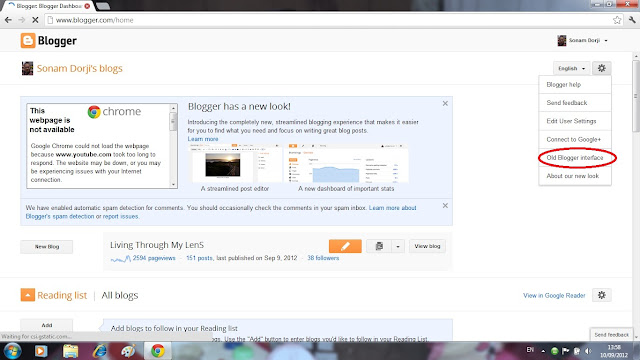
8. Now go to your blogger layout and click on the spot that I have circled in red color below.
9. Now choose
old Blogger interface like I have circled below. Your blogger layout will change to a old version.
10. Now your Blogger layout will look like the following. Click on Design option like I have circled below
11. You will get the following window. Click on the
Edit HTML option that I have circled below.
12. Now you will get the following window. Click on the
Choose file option and select the file that you have downloaded before.
13. Now after you have clicked on the choose file option. select the particular file that I have circled below. Now you click on the upload option.
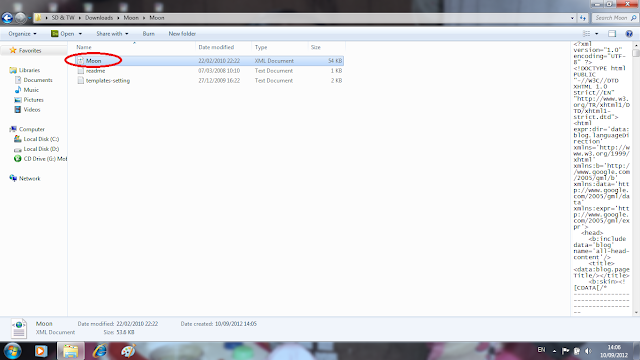
14. You will get a new window after you have clicked on the
upload option. click on keep the widgets and wait. Your template will be applied.
(To save old blog look, there is a option to save your classic template; so click on that the option, if by chance you don't the new template. You can always come back to your old template.)
Now you are done!. Sometimes your widgets will overlap with the post and your blog will look disorganized. Don't panic during that time. Just Go to the Blogger layout and re-position the widgets. Will work like a magic!
(Any kinds of doubts and problems faced; feel free to drop here or in my email address, sdoji30@yahoo.com. I will be more than happy to help out. )


